
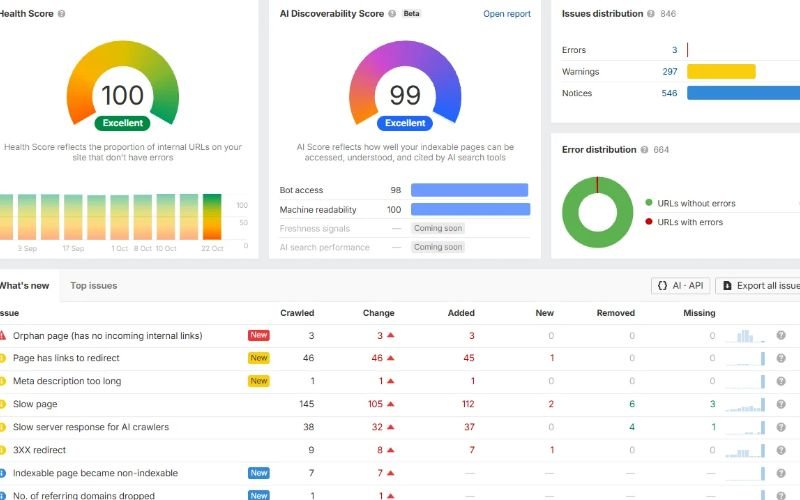
A website can have useful content, relevant keywords, and quality backlinks but still struggle to gain organic visibility. Sometimes, the problem is not what the website says. It is how search engines access, render, interpret, and index its pages.
This is where technical SEO becomes essential.
Technical SEO focuses on improving the underlying structure and performance of a website so search engines can discover and understand its important pages. It also helps create a better experience for visitors by addressing issues such as slow loading, broken navigation, duplicate URLs, and mobile usability.
For businesses investing in organic search, technical SEO provides the foundation that allows content and other SEO efforts to work effectively. It cannot guarantee rankings, but unresolved technical problems can prevent valuable pages from reaching their intended audience.
This guide explains what technical SEO is, which elements matter most, how to perform a technical SEO audit, and when professional technical SEO services may be worth considering.
What Is Technical SEO?
Technical SEO is the process of improving a website’s technical infrastructure to help search engines crawl, render, index, and understand its content. It includes managing website accessibility, indexability, URL structures, redirects, duplicate pages, site speed, structured data, and other technical factors.
Unlike content optimization, which focuses on the information on a page, technical SEO examines whether the website’s underlying setup allows that information to be discovered and processed correctly.
For example, an ecommerce business may publish hundreds of well-optimized product pages. However, if important product URLs are blocked from crawling, incorrectly marked as non-indexable, or buried behind complicated navigation, those pages may not appear in search results as intended.
A technical SEO review helps identify these problems and prioritize the fixes that matter.
What does technical SEO include?
The main areas of technical SEO include:
- Crawling and indexability: Making important pages accessible to search engine crawlers and eligible for indexing.
- Website architecture: Organizing pages and internal links so visitors and search engines can navigate the site.
- XML sitemaps and robots.txt: Helping search engines discover relevant URLs and managing crawler access appropriately.
- Canonicalization and duplicate content: Identifying preferred URLs when similar or duplicate versions exist.
- Website performance: Improving loading speed, responsiveness, visual stability, and Core Web Vitals.
- Mobile usability: Ensuring important content and functionality work across mobile devices.
- Redirects and HTTP status codes: Preventing broken paths, redirect chains, and incorrect responses.
- Structured data: Providing machine-readable information about supported types of content.
- JavaScript SEO: Ensuring important content and links remain accessible when a website relies on JavaScript.
These elements work together. Fixing one issue may not be enough if other technical problems continue to affect the same pages.
Why Is Technical SEO Important?
Technical SEO matters because search engines must be able to access and process a page before it can become a useful search result. Google’s documented search process includes crawling, indexing, and serving results, and not every discovered page necessarily passes through all three stages.
Consider a local service business that has created separate pages for each service it offers. If the pages are accessible but have no meaningful internal links, search engines may have difficulty discovering them through the site’s navigation. If a page contains an accidental noindex directive, it may not appear in search results even when the content is useful.
Technical SEO helps address these barriers.
It can also support other business objectives:
- Protect existing organic visibility: Detect indexing problems, broken URLs, and migration errors before they affect more pages.
- Improve the user experience: Reduce unnecessary loading delays, confusing navigation, and unexpected layout movement.
- Support website growth: Maintain manageable URL structures as new services, products, or locations are added.
- Make content easier to discover: Connect important pages through logical internal links and suitable sitemaps.
- Support search understanding: Use descriptive metadata, accessible content, and relevant structured data.
- Help measure SEO performance: Ensure tracking and reporting systems provide useful information about organic traffic and conversions.
Technical SEO is not a replacement for valuable content, relevant backlinks, or a clear business proposition. It helps remove technical obstacles that can limit the effectiveness of those investments.
Technical SEO vs. On-Page SEO vs. Off-Page SEO
All three areas contribute to an SEO strategy, but they address different aspects of website visibility.
| SEO type | Main focus | Examples |
| Technical SEO | Website infrastructure and accessibility | Crawling, indexing, redirects, performance, canonical tags |
| On-page SEO | Page content and relevance | Titles, headings, search intent, internal links, content quality |
| Off-page SEO | Signals and reputation beyond the website | Relevant backlinks, digital PR, brand mentions |
Suppose a business publishes a detailed guide targeting a competitive search term.
On-page SEO helps make the guide useful, relevant, and easy to understand. Technical SEO ensures the page can be crawled and indexed correctly. Off-page SEO may help strengthen its authority through relevant external references and links.
A well-rounded SEO strategy considers all three rather than treating technical fixes as a complete ranking solution.
The Most Important Technical SEO Elements
1. Crawlability and indexability
Crawlability refers to a search engine’s ability to access a URL. Indexability refers to whether the page can be included in the search engine’s index.
A page may be crawlable but not indexed. For example, a crawler might access a page containing a noindex directive, but the directive instructs search engines not to include that page in their index.
During a technical SEO audit, review:
- Whether important pages return successful HTTP responses.
- Whether robots.txt unintentionally blocks important content.
- Whether page-level robots directives contain accidental noindex instructions.
- Whether important pages have appropriate canonical tags.
- Whether internal links lead to the intended URLs.
- Whether Google Search Console reports unexpected indexing exclusions.
Practical example: If a newly published service page is missing from Google, do not immediately rewrite its content. First, inspect the URL in Google Search Console, check its HTTP response, review robots directives and canonicalization, and confirm that the page can be discovered through internal links.
This approach addresses potential technical causes before making unnecessary content changes.
2. XML sitemap optimization
An XML sitemap lists URLs that a website wants search engines to discover. It is particularly useful for larger websites, newly published pages, and sites with frequently changing content.
A well-maintained sitemap should generally include canonical URLs that return successful responses and are intended for indexing.
Check that your sitemap does not contain:
- Redirecting URLs.
- URLs returning 404 or server errors.
- Pages intentionally excluded from indexing.
- Duplicate URL variations.
- Old URLs that have been permanently replaced.
Submit the sitemap through Google Search Console and investigate unexpected discrepancies between submitted URLs and indexed pages.
A sitemap helps with discovery, but it does not guarantee that Google will crawl or index every listed URL.
3. Robots.txt configuration
The robots.txt file provides crawler instructions about which paths they may request. Incorrect rules can prevent search engines from accessing important sections of a website.
For instance, a development team might accidentally deploy a rule that blocks crawling of a product directory or a service section.
Review the file at the root of the relevant host, typically:https://example.com/robots.txt
Confirm that the rules match the site’s intended crawling policy.
One distinction is especially important: robots.txt is not a reliable way to remove a URL from Google’s index. A blocked URL may still be known to Google through external or internal references. If a page must be excluded from indexing, use an appropriate method such as a crawlable noindex directive or access restriction, depending on the requirement.
4. Canonical tags and duplicate URLs
Duplicate or substantially similar pages can create uncertainty about which URL should represent a piece of content in search results.
Common causes include:
- HTTP and HTTPS versions.
- WWW and non-WWW variations.
- URL parameters used for tracking or filtering.
- Product pages accessible through multiple category paths.
- Trailing-slash variations.
- Similar pages generated by a content management system.
A canonical tag identifies the preferred URL among duplicate or similar pages. Search engines may consider this signal alongside redirects, internal links, sitemaps, and other evidence when selecting a canonical URL.
For example, a product page may be accessible through a tracking URL: https://example.com/product/shoes?campaign=email
The clean product URL may be the preferred canonical: https://example.com/product/shoes
The correct implementation depends on how the site handles parameters and whether the pages contain equivalent content.
Do not automatically canonicalize every similar page to the homepage or one category URL. Canonical tags should reflect the actual relationship between the pages.
5. Website architecture and internal linking
A logical website structure helps visitors navigate content and allows crawlers to discover pages through links.
For example, an ecommerce website might organize its content as follows:
- Homepage
- Product categories
- Subcategories
- Product pages
- Subcategories
- Product categories
- Buying guides
- Shipping and returns
- Customer support
A local service business might organize its website around core services, supporting service pages, and genuinely useful location pages.
During a technical SEO audit, identify important pages that receive few internal links, have unclear navigation paths, or can only be reached through site search or complicated filters.
Improve internal linking by:
- Linking from relevant category pages to important subcategories.
- Connecting supporting articles to relevant service pages.
- Using descriptive anchor text.
- Removing unnecessary redirect hops from internal links.
- Maintaining accessible navigation and pagination.
- Avoiding large numbers of low-value URLs generated by filters.
The objective is not to make every page an identical distance from the homepage. It is to make important content discoverable through a coherent structure that serves users.
6. Website speed and Core Web Vitals
A website that loads slowly or responds poorly can frustrate visitors, particularly on mobile devices. Performance work should focus on actual bottlenecks rather than chasing a perfect score from a single test.
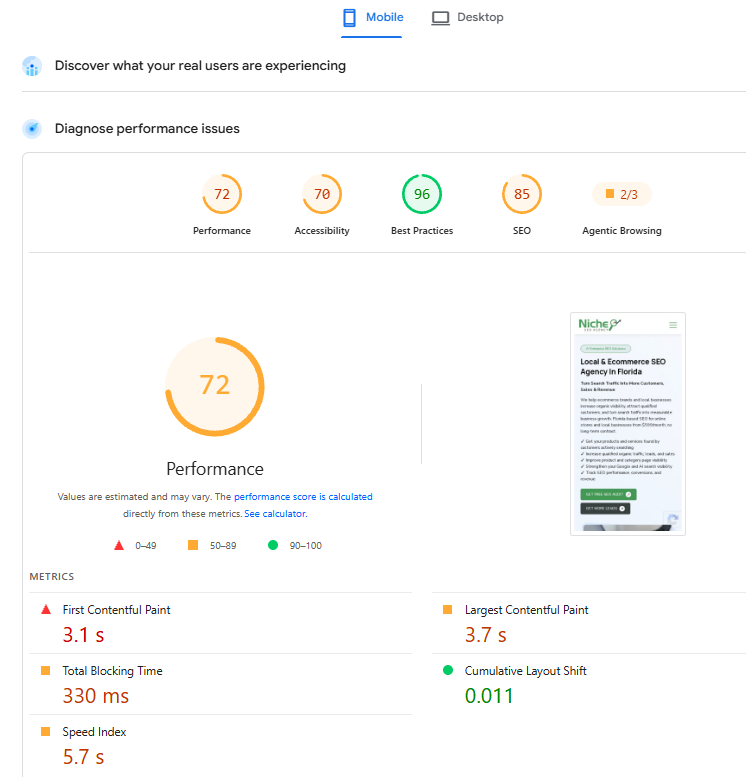
Google’s Core Web Vitals assess loading performance, responsiveness, and visual stability through three metrics.
Largest Contentful Paint (LCP)
2.5 seconds or less
Measures how quickly the main visible content loads.
Interaction to Next Paint (INP)
200 milliseconds or less
Measures responsiveness to user interactions.
Cumulative Layout Shift (CLS)
0.1 or less
Measures unexpected movement of visible page content.
These are Google’s recommended good-performance thresholds, evaluated at the 75th percentile of real-user visits and segmented by device type.
Common performance improvements include:
- Compressing and appropriately sizing images.
- Using modern image formats where suitable.
- Reducing unnecessary JavaScript and CSS.
- Reviewing third-party scripts, chat widgets, and advertising tags.
- Caching static assets effectively.
- Improving server response times.
- Reserving space for images, ads, and embedded content.
- Investigating long-running JavaScript tasks that delay interactions.
Use PageSpeed Insights to review lab diagnostics and available real-user data. Use the Google Search Console Core Web Vitals report to investigate field performance.
A Lighthouse score is useful for diagnosing opportunities, but it is not the same as real-user Core Web Vitals data. Performance improvements should be measured alongside user experience and business outcomes.
7. Mobile usability and responsive design
Google primarily uses the mobile version of a website’s content for indexing. If the mobile version omits important content, metadata, structured data, or links found on desktop, search engines may not receive equivalent information.
Check the following:
- Important text and headings are available on mobile.
- Navigation links work without relying on inaccessible interactions.
- Forms are usable on smaller screens.
- Buttons and interactive controls are easy to operate.
- Images fit the screen without causing layout problems.
- Popups do not prevent users from accessing important content.
- Mobile pages expose the information needed to understand their purpose.
Responsive design is generally a practical way to serve the same core content across different screen sizes. However, simply passing a mobile usability test does not guarantee strong organic performance.
8. HTTP status codes, broken links, and redirects
HTTP status codes tell browsers and crawlers what happened when a URL was requested.
| Status code | Meaning | SEO action |
| 200 | Request succeeded | Confirm the page contains the intended content |
| 301 | Permanent redirect | Point to the appropriate replacement URL |
| 302 | Temporary redirect | Confirm the temporary behavior is intentional |
| 404 | Resource not found | Restore, redirect when appropriate, or leave as a genuine 404 |
| 5xx | Server error | Investigate server availability and application problems |
Redirects are especially important during website redesigns, URL changes, and domain migrations.
For example, if an established service page moves to a new URL, a relevant permanent redirect can help users and search engines reach the replacement. Redirecting every removed page to the homepage is rarely a good default because the destination may not satisfy the original intent.
Also check for:
- Redirect chains and loops.
- Internal links pointing to redirected URLs.
- Broken links on high-value pages.
- Soft 404 pages that return a success response despite showing missing-content messages.
- Intermittent server errors.
Fixing these issues can improve navigation and reduce avoidable crawling problems.
9. Structured data and schema markup
Structured data provides explicit, machine-readable information about the content of a page. Depending on the page type and Google’s supported search features, valid markup can make a page eligible for certain enhanced search appearances.
Examples of relevant schema types include:
- Organization for appropriate business information.
- Article or BlogPosting for editorial content.
- BreadcrumbList for breadcrumb navigation.
- Product for qualifying product pages.
- LocalBusiness or a more specific subtype when the business and page qualify.
Use only markup that accurately represents visible page content and meets the relevant guidelines. Validate it using Google’s Rich Results Test and monitor eligible features in Search Console.
Structured data does not guarantee rich results or higher rankings. Google can choose not to display an enhancement even when markup is valid.
10. JavaScript SEO and rendering
JavaScript frameworks and interactive website features can make websites more useful, but they require careful implementation when search visibility matters.
Google can render JavaScript, but rendering introduces additional considerations. Important content should not depend on an interaction that crawlers cannot perform, and essential links should be exposed in a crawlable format.
During an audit, inspect:
- Whether main content appears in the rendered HTML.
- Whether internal links use crawlable anchor elements.
- Whether metadata changes correctly for each URL.
- Whether product or service information is available without requiring user actions.
- Whether API failures prevent important content from appearing.
- Whether canonical tags and robots directives remain correct after rendering.
Use Google Search Console’s URL Inspection tool to compare the live page with the indexed version where available. For complex applications, work with developers to determine whether server-side rendering, static generation, or another rendering approach is appropriate.
11. HTTPS, security, and site migrations
HTTPS protects data exchanged between a browser and a website. It is also part of Google’s recommended website setup.
Review:
- Valid SSL/TLS configuration.
- Consistent HTTPS URLs.
- Redirects from HTTP to the preferred HTTPS version.
- Mixed-content issues where insecure resources load on secure pages.
- Canonical tags and sitemaps using the correct protocol.
- Redirect mappings during domain changes or website redesigns.
For a site migration, prepare a URL mapping before launch, test redirects, update internal links, verify canonical tags, and submit the updated sitemap. Monitor indexing, organic traffic, and important landing pages after the change.
Avoid making unrelated design, content, URL, and platform changes simultaneously if you can separate them. Doing so makes it easier to identify the cause of unexpected performance changes.
How to Do Technical SEO: A Step-by-Step Process
Understanding technical SEO is one thing. Applying it to a real website requires a structured process that connects audit findings to business priorities.
The following workflow works for most business websites, with additional checks needed for large ecommerce stores and JavaScript-heavy platforms.
Step 1: Establish a baseline
Before making changes, document the site’s current performance.
Start with:
- Google Search Console for indexing, organic clicks, impressions, and search performance.
- Google Analytics 4 for organic landing-page engagement and conversions, if configured.
- A crawler such as Screaming Frog SEO Spider for URLs, status codes, metadata, directives, and internal links.
- PageSpeed Insights for performance diagnostics.
- Server logs, when available and relevant, to understand crawler activity and server responses.
Record the current state of important landing pages, indexed URLs, organic traffic, and conversions. This baseline helps you assess whether later changes improve the website or introduce new problems.
Step 2: Crawl the website
Run a crawl using an appropriate configuration for the site’s size and technology.
Review the results for:
- Broken internal links.
- Redirecting internal links.
- Missing or duplicate title tags.
- Missing H1 headings.
- Non-indexable URLs.
- Canonical inconsistencies.
- Orphan pages identified by comparing crawl data with sitemaps and analytics.
- Duplicate URL patterns.
- Pages with unusually deep click depth.
Do not assume every reported issue needs fixing. A missing heading on a low-value utility page may be less important than a canonical error affecting an entire product category.
Step 3: Check indexing in Google Search Console
Open the Page Indexing report and investigate patterns rather than treating every excluded URL as an error.
For example:
- A page excluded because of a valid redirect may be behaving correctly.
- A filtered product URL excluded through canonicalization may be intentional.
- A valuable service page marked noindex accidentally needs attention.
- A page returning a server error may require development support.
Inspect representative URLs using URL Inspection. Check the selected canonical, indexing status, crawl information, and live-page rendering where available.
The objective is to understand why pages are excluded and whether those exclusions match the site’s intended search strategy.
Step 4: Audit technical configuration
Review robots.txt, XML sitemaps, canonical tags, meta robots directives, redirects, and HTTP status codes.
Compare these elements against a list of pages that should be indexed.
For example, if a priority service page is included in the sitemap but its HTML contains a noindex directive, the configuration is inconsistent. Correct the underlying directive rather than repeatedly resubmitting the sitemap.
Step 5: Test performance on priority pages
Test representative templates rather than checking only the homepage.
For an ecommerce site, review category pages, product pages, search or filter pages, and checkout-related pages where relevant. For a service business, review the homepage, service pages, contact page, and lead-generation landing pages.
Use both lab diagnostics and available real-user data. Investigate whether the main image, JavaScript execution, server response, or third-party scripts are responsible for poor performance.
Step 6: Review architecture and internal links
Identify important pages that are difficult to reach through navigation or receive few relevant internal links.
Review category structures, breadcrumb navigation, pagination, and links between related articles and service pages.
Make changes only when they improve discoverability, navigation, or the clarity of the site’s structure. Avoid reorganizing URLs without a clear reason.
Step 7: Prioritize fixes by impact
Not every technical issue deserves the same urgency.
A practical prioritization model considers four factors:
- SEO impact: Could the issue prevent valuable pages from being crawled or indexed?
- Business importance: Does it affect revenue-generating pages or key lead-generation pages?
- Scope: Does the problem affect one URL, a template, or the entire site?
- Implementation effort: Can it be corrected safely, or does it require substantial development work?
Fix critical accessibility and indexing problems first. Then address widespread template issues, performance bottlenecks, and lower-impact refinements.
Step 8: Validate the fixes
After implementation, rerun the relevant tests.
Confirm that:
- The intended pages return the correct status codes.
- Redirects reach the correct destinations.
- Canonical tags point to the intended URLs.
- Important content remains crawlable and indexable.
- Performance changes are measurable.
- Structured data remains valid.
- Internal links work as expected.
Request recrawling or validation in Search Console where appropriate. Track changes over time rather than assuming a successful deployment will immediately produce ranking improvements.
How to Conduct a Technical SEO Site Audit
A technical SEO audit is a systematic review of a website’s crawlability, indexability, architecture, performance, and other technical elements that may affect organic visibility.
A useful audit does more than produce a long export of errors. It explains which problems matter, which URLs are affected, what is causing each issue, how it should be fixed, and how the result will be verified.
Technical SEO audit checklist
Use this checklist when reviewing a website.
Technical audit checklist
0/20 completed
Crawling and indexing
Check robots.txt for accidental crawl restrictions
Review noindex and X-Robots-Tag directives
Inspect indexing exclusions in Google Search Console
Check important pages with URL Inspection
URLs and duplication
Review canonical tags on priority pages
Identify duplicate URL and parameter patterns
Check HTTP status codes and redirect chains
Confirm sitemap URLs are canonical and indexable
Architecture and links
Identify orphan and deeply buried pages
Find broken internal links
Review breadcrumbs and navigation
Check internal links to redirected URLs
Performance and mobile
Review Core Web Vitals field data
Test representative page templates
Inspect image sizes and JavaScript bottlenecks
Check mobile content and interactive elements
Structured data and monitoring
Validate relevant structured data
Review site migrations and HTTPS consistency
Record baseline organic performance
Document fixes, owners, and validation results
Copy checklistReset
What should a technical SEO audit report include?
A professional technical SEO audit report should contain the following information:
| Report section | What to include |
| Executive summary | The main findings and their likely business implications |
| Issue inventory | Specific URLs, issue descriptions, and affected templates |
| Evidence | Crawl data, Search Console observations, test results, or relevant screenshots |
| Priority | Severity, business importance, and scope |
| Recommendations | Specific corrective actions |
| Ownership | Whether SEO, development, content, or another team must implement the fix |
| Validation plan | How the team will confirm the issue is resolved |
| Measurement | The relevant technical, organic, and conversion metrics to monitor |
This structure makes the audit useful to business owners, marketing teams, and developers.
A list of 500 warnings is not necessarily more valuable than a report identifying three critical problems that prevent important pages from being indexed.
How long does a technical SEO audit take?
The time required depends on website size, platform complexity, access to analytics and server data, and the number of problems discovered.
A small brochure website may need a focused review, while a large ecommerce site with faceted navigation, thousands of URLs, and JavaScript rendering issues may require a more extensive investigation.
The audit and implementation should also be treated as separate activities. Finding an issue does not mean it has been fixed, and deploying a fix does not automatically confirm that it worked.
Common Technical SEO Problems and How to Fix Them
The following table summarizes common problems and practical responses.
| Problem | Possible cause | Recommended response |
| Important pages are not indexed | noindex, crawl restrictions, canonicalization, poor discovery, or other indexing issues | Inspect the affected URLs and correct the underlying cause |
| Organic traffic drops after a migration | Missing redirects, incorrect canonicals, changed content, or indexing problems | Compare old and new URLs, inspect Search Console, and review migration implementation |
| Duplicate pages appear | Parameters, alternate URL versions, or repeated templates | Establish a consistent URL and canonicalization strategy |
| Pages load slowly | Large images, server delays, JavaScript, or excessive third-party scripts | Diagnose bottlenecks and optimize the relevant components |
| Crawl reports show many 404s | Removed pages, broken internal links, or outdated external references | Restore valuable pages or redirect to relevant replacements where appropriate |
| Google shows the wrong URL | Conflicting canonical signals or duplicate page versions | Align canonical tags, internal links, redirects, and sitemap entries |
| Structured data errors appear | Invalid markup or incorrect properties | Correct the markup and validate it again |
| Search engines struggle with JavaScript pages | Important content or links are not exposed as expected | Inspect rendered content and review the rendering implementation |
The same symptom can have several causes. For example, an unindexed page is not necessarily affected by a technical error; Google may choose not to index a page for other reasons. Diagnose the evidence before changing the website.
Technical SEO for Ecommerce Websites
Ecommerce websites often need more extensive technical SEO work than smaller service websites because they may contain thousands of products, category pages, filters, variants, and automatically generated URLs.
A small configuration problem can affect an entire template. That is why ecommerce technical SEO should consider both individual URLs and the rules that generate them.
Managing faceted navigation and filter URLs
Filters help shoppers narrow products by size, color, price, brand, and other attributes. However, combinations of filters can generate a large number of URLs with little unique search value.
For example:
- /shoes/
- /shoes/?color=black
- /shoes/?size=10
- /shoes/?color=black&size=10
Not every filtered combination needs to be indexed.
Review which filter pages have meaningful search demand, distinct inventory, and a useful purpose for organic visitors. Then establish a deliberate strategy for crawling, indexability, canonicalization, and internal linking.
Avoid blocking every filter URL without first checking how the site uses those URLs and whether any currently provide valuable organic traffic. Google provides specific guidance on managing faceted navigation and crawling.
Optimizing product pages and variants
Product pages should have consistent canonical behavior and clear relationships between variants.
Check whether:
- Each important product has a stable, descriptive URL.
- Variants use appropriate URLs when distinct search visibility is intended.
- Duplicate product URLs resolve consistently.
- Out-of-stock pages provide useful information and follow an intentional availability policy.
- Product images have descriptive alternative text.
- Relevant product structured data reflects visible product information.
- Product pages are linked from relevant categories and collections.
Do not automatically remove every out-of-stock product page. If the product is temporarily unavailable, preserving the page may help existing visitors and retain useful information. Permanent discontinuation requires a decision based on replacement products, user intent, and the page’s value.
Optimizing category pages and pagination
Category pages often help search engines understand how products are grouped.
Review category descriptions, internal links, pagination, canonical tags, and the accessibility of products beyond the first page.
Avoid relying exclusively on infinite scrolling if it prevents important products from being discovered through crawlable links. Ensure that the site provides a search-friendly way to access relevant products across the catalog.
Handling ecommerce platform limitations
Shopify, WooCommerce, Magento, BigCommerce, and other platforms differ in their default URL structures and technical controls.
Before implementing a fix, understand whether the issue originates in the platform, theme, plugin, application, or server configuration. Some problems can be solved through settings, while others require custom development.
A good technical SEO audit service should explain those dependencies instead of recommending the same implementation for every website.
How to Choose a Technical SEO Agency
Hiring a technical SEO agency makes sense when a website has complex indexing issues, recurring technical problems, a major migration planned, or development work that requires specialist coordination.
The right provider should be able to explain both the problem and its business relevance.
Use the following criteria when evaluating potential agencies.
1. Audit quality
Ask for a sample audit report with confidential information removed. Look for specific findings, evidence, affected URLs, priorities, and implementation instructions rather than a generic list of tool warnings.
2. Technical knowledge
The provider should understand crawling, indexing, canonicalization, JavaScript rendering, site migrations, structured data, and performance diagnostics.
3. Development collaboration
Some SEO issues require code changes. Ask how the agency works with your developers, testing environment, CMS, and release process.
4. Prioritization
A useful technical SEO agency will explain which problems matter most and why. It should distinguish critical indexing issues from optional improvements.
5. Transparent reporting
Reports should separate work completed, issues resolved, issues awaiting implementation, and organic performance changes. Rankings and traffic can fluctuate for reasons unrelated to technical fixes, so attribution should be handled carefully.
6. Clear scope and deliverables
Confirm whether the engagement includes the audit only, implementation support, post-fix validation, ongoing monitoring, or all four.
Avoid providers that promise guaranteed rankings, claim that every technical warning is a ranking problem, or recommend large-scale changes without explaining the risks.
When Do You Need a Technical SEO Audit Service?
A dedicated technical SEO audit service can be useful when internal teams lack the time, tools, or expertise to diagnose complex website issues.
Consider a professional review if:
- Important pages are not appearing in search results.
- Organic traffic has dropped unexpectedly.
- A website redesign or domain migration is planned.
- Your ecommerce catalog has grown substantially.
- Google is selecting unexpected canonical URLs.
- Performance problems affect important landing pages.
- A JavaScript framework or CMS change has altered how pages render.
- Repeated technical issues remain unresolved after previous audits.
For a smaller website with stable architecture, an initial audit followed by periodic monitoring may be sufficient. A larger website undergoing frequent releases may need continuous technical oversight.
The scope should match the actual problem rather than defaulting to a large monthly retainer.
What should technical SEO services include?
Depending on your website and business objectives, technical SEO services may include:
- Website crawling and indexability analysis.
- XML sitemap and robots.txt reviews.
- Canonicalization and duplicate URL analysis.
- Redirect and broken-link audits.
- Core Web Vitals and performance recommendations.
- Mobile and JavaScript SEO checks.
- Structured data validation.
- Website architecture and internal-link analysis.
- Migration planning and post-launch monitoring.
- Prioritized implementation recommendations.
- Post-fix validation and performance reporting.
For Niche SEO Agency, the most useful positioning is to emphasize diagnosis, prioritized fixes, implementation guidance, and validation rather than presenting technical SEO as a collection of automated reports.
If your website needs a deeper review, visit Niche SEO Agency to explore your SEO options. The next step should be to identify the technical problems affecting your site and determine which fixes are most relevant to your business.
Technical SEO and AI Search: What Website Owners Should Know
AI-powered search experiences have made it increasingly useful to create content that is clear, well-structured, and supported by reliable sources. However, AI search optimization does not replace technical SEO fundamentals.
A technically sound website gives search engines and other systems a better opportunity to access its public content, interpret its structure, and identify relevant information. Whether a particular AI platform crawls, retrieves, or cites a page depends on its own systems, access rules, and selection criteria.
For businesses that want to improve their visibility across traditional and AI-assisted search, focus on these practical steps:
- Keep important pages accessible and free from accidental indexing restrictions.
- Use clear headings that explain what each section covers.
- Answer specific questions directly.
- Publish original information and substantiate technical claims with credible sources.
- Maintain accurate business and organization details.
- Use appropriate structured data where supported.
- Build logical internal links between related pages.
- Monitor search performance and referral traffic where reliable reporting is available.
There is no technical tag that guarantees citation in ChatGPT, Google AI Overviews, Perplexity, or another AI-powered search experience. Clear content, accurate information, accessible pages, and credible supporting evidence are more defensible priorities than promises of guaranteed AI citations.
For further guidance, consult the official Google Search Central documentation.
Frequently Asked Questions About Technical SEO
What is technical SEO in simple terms?
Technical SEO is the process of making a website easier for search engines to access, understand, and index. It includes crawling, indexing, site architecture, redirects, canonical tags, performance, mobile accessibility, and structured data.
What is a technical audit for an SEO website?
A technical SEO audit is a structured examination of a website’s technical setup to identify problems that may affect search engine discovery, indexing, performance, or usability. A useful audit documents the issue, its evidence, affected URLs, recommended fix, and validation method.
How do you do technical SEO?
Start by reviewing Google Search Console and crawling the website. Check indexing, robots.txt, XML sitemaps, canonical tags, redirects, internal links, mobile rendering, and Core Web Vitals. Prioritize issues based on business impact, implement the necessary fixes, and validate the results.
How do you perform a technical SEO audit?
To perform a technical SEO audit, establish a baseline, crawl the website, inspect important URLs in Search Console, review technical directives and URL handling, test performance, examine internal linking, and prepare a prioritized implementation report. Validate each fix after deployment.
How often should you conduct a technical SEO audit?
The frequency depends on website complexity and how often the site changes. A stable business website may need a comprehensive review periodically and after significant changes. A large ecommerce site or website with frequent deployments may benefit from continuous monitoring and recurring audits.
Which tools are useful for a technical SEO audit?
Common tools include Google Search Console, Google Analytics 4, Screaming Frog SEO Spider, PageSpeed Insights, Lighthouse, and browser developer tools. Server logs and other crawling or performance tools may also be useful for larger or more complex sites.
Does technical SEO guarantee higher Google rankings?
No. Technical SEO can help remove barriers to crawling, indexing, and usability, but rankings depend on many factors, including relevance, content quality, competition, and Google’s systems. Correcting a technical problem does not guarantee a ranking improvement.
How much do technical SEO services cost?
Pricing depends on website size, technical complexity, audit depth, implementation requirements, and ongoing monitoring. A focused audit for a small business site will generally involve a different scope from a large ecommerce migration. Request a clear list of deliverables and implementation responsibilities before comparing quotes.
Can technical SEO improve AI search visibility?
Technical SEO can support the accessibility and interpretation of website content, which is a useful foundation for search visibility. However, no technical SEO practice guarantees that an AI platform will retrieve, mention, or cite a specific website.
What is the difference between a technical SEO audit and ongoing technical SEO services?
A technical SEO audit identifies and prioritizes problems at a particular point in time. Ongoing technical SEO services may include monitoring, implementation support, validation, migration planning, and reviews as the website changes.
Final Thoughts
Technical SEO is most effective when it addresses real obstacles rather than chasing a perfect audit score. The priorities for a local service website may be different from those for an ecommerce store with thousands of filter combinations and product URLs.
Start with the pages that matter most to the business. Confirm that search engines can access and interpret them correctly, investigate performance problems, and resolve the highest-impact issues first.
A well-executed technical SEO audit gives business owners and marketing teams a clearer picture of what is working, what needs attention, and where development resources should be spent.
If you suspect technical issues are limiting your website’s organic visibility, Contact to Niche SEO Agency to explore your next steps. Focus on evidence-based recommendations and measurable improvements rather than promises of instant rankings