
You were receiving orders consistently last month. Customers were visiting your website, adding products to their carts, and completing purchases. Then something changed. Orders started slowing down, fewer customers completed checkout, and your daily sales numbers no longer looked the same.
If you are wondering, “Why are my ecommerce sales suddenly dropping?”, the first step is to find out where customers are leaving your buying journey.
A decline in ecommerce orders does not always mean your products have lost demand or your marketing has stopped working. Sometimes, a small technical issue prevents customers from completing payments. In other cases, higher shipping costs, unavailable products, poor mobile experiences, or changes in advertising campaigns can affect purchase decisions.
The challenge is identifying the actual cause instead of making random changes to your website or increasing your advertising budget without understanding the problem.
This guide explains 17 common reasons ecommerce sales decline, how to investigate each issue, and what you can do to recover lost orders.
Why Are My Ecommerce Sales Suddenly Dropping?
Ecommerce sales can suddenly decline when fewer qualified visitors reach your store, fewer visitors decide to purchase, or more customers abandon the buying process before completing checkout.
The most common causes include:
- A sudden decline in qualified website traffic.
- Lower product page or checkout conversion rates.
- Changes in customer preferences and buying behaviour.
- Competitors offering more attractive prices or delivery options.
- Product pages with missing information or purchasing errors.
- Products becoming unavailable.
- Poor website performance or navigation.
- Unexpected shipping charges.
- Payment gateway failures.
- Negative reviews and reduced customer trust.
- Changes to advertising campaigns or targeting.
- Seasonal demand fluctuations.
However, these issues do not affect every store in the same way. A store receiving fewer orders from the same number of visitors has a different problem from a store that has lost half its traffic.
Before making changes, you need to identify which part of the purchasing journey has changed.
How to Identify Why Your Ecommerce Orders Are Declining
Start by comparing your current performance with a previous period when your store was receiving a normal number of orders.
Do not rely on revenue alone. Your average order value, discounts, refunds, and product mix can change revenue without explaining what happened to purchase volume.
For example, suppose your online store previously received 100 orders per day but now receives only 60.
That is a 40% decline in completed orders. Your investigation should focus on what changed between those two periods.
1. Compare your order volume
Check the following metrics:
- Total completed orders.
- Number of purchasing customers.
- Website sessions.
- Product page views.
- Add-to-cart events.
- Checkout initiations.
- Completed purchases.
- Checkout abandonment.
- Conversion rate.
Use the same date range, weekdays, reporting timezone, and attribution rules when comparing periods.
2. Check your ecommerce conversion funnel
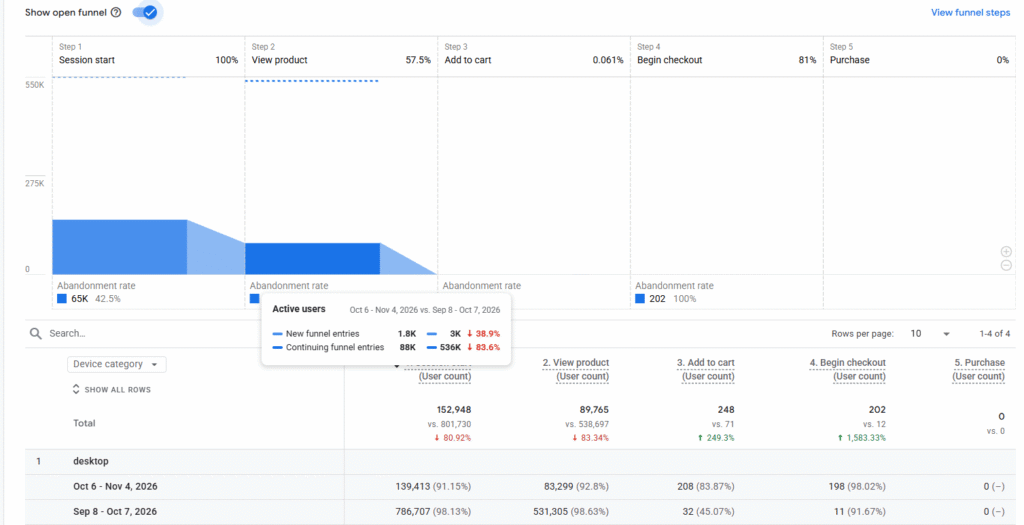
Your ecommerce conversion funnel shows where customers leave before purchasing.
| Funnel stage | What to investigate |
| Website visit | Are fewer people reaching your store? |
| Product view | Are visitors viewing relevant products? |
| Add to cart | Are customers interested enough to add products? |
| Begin checkout | Are customers moving towards payment? |
| Add payment information | Are customers reaching the payment stage? |
| Purchase | Are transactions being completed successfully? |
Google Analytics 4 supports ecommerce events such as view_item, add_to_cart, begin_checkout, add_shipping_info, add_payment_info, and purchase.
These events help you understand shopping behaviour and identify where the purchasing journey breaks down.
3. Segment the data instead of looking at total orders
Break down your results by:
- Organic search.
- Paid search.
- Paid social.
- Direct traffic.
- Email marketing.
- Referral traffic.
- Desktop, mobile, and tablet.
- Country and region.
- Product category.
- Individual products.
- New and returning customers.
For example, if desktop orders remain stable but mobile orders fall significantly, investigating your entire marketing strategy may be unnecessary. Your mobile shopping experience deserves immediate attention.
Once you understand where the decline is happening, investigate the following causes.
17 Reasons Your Ecommerce Sales Are Suddenly Dropping (And How to Fix Them)
1. Sudden Changes in Website Traffic
A decline in website visitors can directly affect the number of orders your store receives.
Imagine your store normally receives 5,000 monthly visitors. If that number falls to 2,500 while your conversion rate remains unchanged, you should expect fewer orders.
However, the important question is not simply whether traffic declined. You need to understand which traffic source lost visitors and whether the missing visitors were likely to purchase.
Possible causes:
- Organic search clicks have declined.
- Paid advertising campaigns are receiving fewer impressions.
- Social media referrals have decreased.
- Email campaigns are generating fewer visits.
- Referral links have disappeared.
- Certain product or category pages are no longer attracting visitors.
- Your website has become difficult to access.
How to investigate:
Open Google Analytics 4 and compare traffic acquisition reports across the affected periods.
Then check Google Search Console for changes in search clicks, impressions, queries, and landing pages.
Pay attention to whether the decline is limited to a specific channel, product category, location, or device.
How to fix it:
- Identify the traffic source responsible for the decline.
- Review important landing pages and their current performance.
- Check whether advertising campaigns are active and delivering.
- Investigate broken URLs and unexpected redirects.
- Review changes in search visibility where organic traffic is affected.
- Restore relevant traffic sources instead of increasing every marketing budget.
Example: If your product pages continue receiving visitors but your blog traffic has disappeared, that does not automatically explain a decline in purchases. Focus on the landing pages and channels that previously generated customers.
2. Your Ecommerce Conversion Rate Has Declined
Your website might still attract the same number of visitors, but fewer people are purchasing.
This is one of the most important reasons ecommerce businesses experience fewer orders.
Your conversion rate measures the proportion of visitors or sessions that result in a purchase, depending on the reporting method used.
A simple calculation is:
Conversion rate = (Number of purchases ÷ Number of sessions) × 100
For example:
- Previous period: 5,000 sessions and 150 purchases.
- Current period: 5,000 sessions and 75 purchases.
Your session-based purchase conversion rate has fallen from 3% to 1.5%.
The traffic is unchanged, but the store is converting fewer visits into purchases.
Why conversion rates decline:
- Product pages are no longer persuasive.
- Prices have increased.
- Customers face unexpected checkout charges.
- Payment options are limited.
- The website is slower.
- The checkout process has become complicated.
- Visitors are arriving from less relevant marketing campaigns.
How to fix it:
Start with your highest-traffic product and category pages. Review their product information, pricing, images, calls to action, delivery details, and customer reviews.
Next, examine the checkout funnel. Identify whether customers are leaving after adding products to their carts or after entering their payment information.
Do not redesign your entire website based on a single conversion-rate change. Identify the affected pages and customer segments first.
3. Customer Buying Behaviour Has Changed
Your customers may no longer be shopping the way they did several months ago.
Changes in economic conditions, personal budgets, product preferences, buying priorities, and shopping habits can influence purchasing decisions.
For example, customers who previously purchased premium products may start comparing lower-priced alternatives. Others may take longer to make purchasing decisions or wait for promotional periods.
Common signs:
- More product views but fewer purchases.
- Increased wishlist activity.
- More repeat visits before a purchase.
- Higher interest in lower-priced products.
- Customers purchasing different product categories.
- More abandoned carts without an obvious technical error.
How to investigate:
Compare product-level sales, customer segments, repeat purchase behaviour, search terms, and customer support enquiries.
Look for changes in which products customers view, add to carts, and actually purchase.
Review customer feedback and product questions to understand what might be influencing buying decisions.
How to fix it:
- Update product recommendations based on current customer interests.
- Make product comparisons easier.
- Explain product benefits and practical use cases.
- Offer suitable product bundles where they make commercial sense.
- Review your pricing against customer expectations.
- Improve product information to reduce purchasing uncertainty.
Avoid assuming that every decline in sales requires a discount. Sometimes customers need better information rather than a lower price.
4. Competitors Are Offering Better Deals
Customers rarely evaluate your store in isolation.
Before purchasing, they may compare your product with alternatives available from other ecommerce websites, marketplaces, and established retailers.
A competitor might offer:
- A lower product price.
- Free or faster shipping.
- Better product bundles.
- A more flexible return policy.
- Additional payment options.
- A stronger warranty.
- Better customer reviews.
- A more convenient purchasing experience.
Even if your product is competitive, a customer may choose another store because the overall purchase feels more attractive.
How to investigate:
Select your most important products and compare them with the same or genuinely comparable products offered by competitors.
Check:
- Product pricing.
- Shipping charges.
- Delivery estimates.
- Available discounts.
- Product specifications.
- Return and refund policies.
- Customer ratings and reviews.
- Payment methods.
How to fix it:
You do not necessarily need to become the cheapest seller.
Instead, identify where your offer is less attractive and improve the overall buying proposition.
For example, you could offer a clearer warranty, a better product bundle, more transparent delivery information, or a loyalty benefit.
Competing only on price can reduce your margins without solving the underlying problem.
5. Product Pages Are Not Converting Visitors into Buyers
Your product page is one of the most important parts of your ecommerce website.
Customers use it to decide whether a product meets their needs and whether they feel comfortable purchasing it from your store.
If visitors are viewing product pages but not adding products to their carts, the problem may be related to product information, pricing, images, or purchasing clarity.
Common product page problems:
- Low-quality product images.
- Missing product descriptions.
- Unclear product specifications.
- No sizing or compatibility information.
- Missing customer reviews.
- Unclear delivery estimates.
- Hidden return policies.
- Confusing product variations.
- Broken add-to-cart buttons.
- Unavailable product options.
How to investigate:
Open your most important product pages on desktop and mobile.
Test the entire buying process yourself. Select product variations, change quantities, add products to the cart, and proceed to checkout.
Review GA4 product-level reports to identify products with substantial views but relatively few add-to-cart events.
How to fix it:
Improve product pages by including:
- Clear, high-quality product photography.
- Accurate descriptions and specifications.
- Product dimensions, sizes, or compatibility details.
- Transparent pricing.
- Stock availability.
- Delivery and return information.
- Genuine customer reviews.
- A visible and functional add-to-cart button.
Do not simply add more text. Give customers the information they need to make a purchasing decision.
6. Your Best-Selling Products Are Out of Stock
Inventory problems can reduce completed purchases even when your website and marketing campaigns are performing normally.
Imagine that one of your best-selling products generates 30% of your store’s orders. If it becomes unavailable, your total order volume could decline significantly.
Customers who arrive through advertisements or organic search may discover that the product they wanted is unavailable.
Common inventory problems:
- Best-selling products are out of stock.
- Popular sizes or colours are unavailable.
- Inventory information is inaccurate.
- Product variations cannot be selected.
- Stock synchronization is failing.
- Products are listed as available when they cannot be fulfilled.
How to investigate:
Review your inventory management system and compare product availability with your ecommerce website.
Check your best-selling products, product variations, stock history, and recent supplier delays.
If you use Google Merchant Center, compare the availability submitted in your product data with the availability displayed on your website.
Google requires product availability information to be consistent between product data, landing pages, and checkout.
How to fix it:
- Replenish important products where possible.
- Update stock information immediately.
- Remove unavailable variations from purchase options.
- Clearly communicate expected restocking dates.
- Offer relevant alternatives.
- Set up low-stock alerts.
- Synchronize inventory across sales channels.
Never advertise a product as available when customers cannot actually purchase it.
7. Poor Website User Experience Is Driving Customers Away
A website can look visually attractive but still make shopping difficult.
Customers expect to find products, understand pricing, compare options, and complete purchases without unnecessary effort.
If navigation is confusing or important information is difficult to locate, customers may leave and purchase elsewhere.
Common user experience problems:
- Confusing navigation menus.
- Too many unnecessary pop-ups.
- Difficult product filtering.
- Poor search functionality.
- Hidden shopping cart.
- Unclear calls to action.
- Too many checkout steps.
- Difficult account creation.
- Broken buttons or forms.
How to investigate:
Use session recordings, heatmaps, and customer feedback to understand how visitors interact with your website.
Tools such as Microsoft Clarity can help identify repeated clicks, scrolling behaviour, and areas where visitors struggle.
Test your website as a first-time customer rather than relying only on your familiarity with its layout.
How to fix it:
- Simplify navigation.
- Make product categories easy to find.
- Improve internal site search.
- Keep important purchase information visible.
- Reduce unnecessary interruptions.
- Make the shopping cart accessible.
- Remove unnecessary checkout steps.
- Test important user journeys regularly.
The objective is to reduce friction between discovering a product and completing the purchase.
8. Customers Are Abandoning Their Shopping Carts
Cart abandonment happens when customers add products to their shopping carts but leave without completing their purchases.
This does not always mean customers have lost interest in the product. They may encounter an unexpected cost, become confused during checkout, or decide that purchasing is not convenient at that moment.
Baymard Institute’s 2026 research identifies additional costs, slow delivery, payment security concerns, account requirements, and complicated checkout processes among the reported reasons for checkout abandonment.
Common reasons for cart abandonment:
- Unexpected shipping charges.
- Taxes and additional fees.
- Mandatory account creation.
- Complicated checkout forms.
- Unclear delivery dates.
- Limited payment options.
- Unexpected discounts or coupon restrictions.
- Technical checkout errors.
How to investigate:
Compare add-to-cart events with begin-checkout and purchase events in GA4.
If customers add products to their carts but do not begin checkout, investigate the cart page, product pricing, and purchase incentives.
If customers begin checkout but do not purchase, investigate shipping, payment, forms, and technical problems.
How to fix it:
- Allow guest checkout.
- Display the total cost earlier.
- Reduce unnecessary form fields.
- Provide multiple suitable payment methods.
- Show clear delivery estimates.
- Make return policies accessible.
- Send appropriate abandoned-cart reminders.
- Test the complete checkout process.
An abandoned cart is a missed purchasing opportunity. However, not every abandoned cart can or should be recovered. Some visitors are simply comparing products or browsing.
9. Payment Gateway Problems Are Preventing Successful Orders
Payment problems can cause an immediate decline in completed purchases.
Customers may be ready to buy, but if their transactions fail, they cannot complete the order.
This issue can be particularly damaging because the customer has already shown strong purchasing intent.
Possible payment-related problems:
- Payment gateway downtime.
- Card authorization failures.
- Incorrect gateway configuration.
- Failed payment redirects.
- Expired API credentials.
- Unsupported payment methods.
- International card restrictions.
- Currency or billing address mismatches.
- Fraud prevention rules blocking legitimate orders.
- Payment confirmation not returning correctly to the website.
How to investigate:
Check your payment provider’s transaction dashboard.
Review:
- Successful payments.
- Declined transactions.
- Failed transactions.
- Authorization errors.
- Refunds.
- Payment method distribution.
- Transaction failures by country or device.
Look for a sudden increase in failed payments around the time completed orders began declining.
You should also check whether successful payments are being recorded correctly in your ecommerce platform.
How to fix it:
- Test a transaction using an authorized test payment method or the gateway’s sandbox.
- Check gateway status and service notifications.
- Review transaction error codes.
- Verify API credentials and payment integrations.
- Check whether your checkout supports the customer’s payment method and location.
- Contact your payment provider if the issue continues.
- Reconcile successful gateway payments with actual ecommerce orders.
Never assume that a decline in GA4 purchase events automatically means payments are failing. Tracking errors can create a similar reporting pattern.
10. High Shipping Costs and Delivery Problems Are Affecting Purchases
Shipping is part of the customer’s purchasing decision.
A product may have an attractive price, but unexpectedly high shipping costs can make the total order unattractive.
Delivery delays can also discourage customers, especially when they need products by a particular date.
Common shipping-related problems:
- High shipping fees.
- Unexpected delivery charges.
- No free shipping threshold.
- Limited shipping destinations.
- Long delivery estimates.
- Poor tracking information.
- Delayed fulfillment.
- Unexpected customs duties.
- Complicated shipping policies.
How to investigate:
Review your shipping settings and compare the displayed shipping costs with the amounts customers see at checkout.
Check whether shipping-related abandonment has increased and whether specific regions or products are affected.
Review recent courier performance and customer support complaints about delivery delays.
How to fix it:
- Display shipping charges before checkout.
- Provide realistic delivery estimates.
- Review courier pricing.
- Consider free shipping thresholds where margins allow.
- Explain international delivery costs.
- Offer suitable delivery options.
- Communicate delays proactively.
- Make order tracking accessible.
A transparent delivery experience helps customers make informed decisions before they reach the payment stage.
11. Seasonal Demand Changes Are Affecting Order Volume
Not every decline in ecommerce sales is caused by a website problem.
Many products experience seasonal purchasing patterns.
For example:
- Winter clothing may sell less during warmer months.
- Holiday decorations may experience concentrated demand.
- Back-to-school products may perform better before school terms begin.
- Certain fitness products may experience demand changes around New Year.
- Outdoor products may sell differently depending on weather and location.
If you compare a peak shopping period with a normal month, the decline may be expected.
How to investigate:
Compare your current order volume with:
- The previous month.
- The same month last year.
- Similar weekdays.
- Previous seasonal periods.
- Relevant promotional periods.
Google Search Console also recommends considering periodic patterns when investigating changes in website traffic.
How to fix it:
- Plan campaigns around customer demand.
- Promote products suited to the current season.
- Review inventory before peak periods.
- Create relevant seasonal bundles.
- Adjust advertising budgets based on demand.
- Avoid treating normal seasonal fluctuations as technical emergencies.
The goal is to understand whether the decline is unusual for your business or part of an established purchasing pattern.
12. Negative Customer Reviews Are Reducing Purchase Confidence
Customers often review feedback before purchasing from an unfamiliar ecommerce store.
A sudden increase in negative reviews can influence purchasing decisions, especially when complaints involve product quality, delivery, refunds, or customer service.
Common review-related issues:
- Repeated complaints about product quality.
- Delayed deliveries.
- Poor customer support.
- Incorrect product descriptions.
- Complicated refund processes.
- Damaged products.
- Unresolved customer complaints.
How to investigate:
Review feedback across your website, Google Business Profile where applicable, marketplaces, and relevant third-party review platforms.
Look for repeated complaints rather than focusing on isolated negative comments.
Compare the timing of negative reviews with changes in product conversion rates.
How to fix it:
- Respond professionally to genuine complaints.
- Investigate recurring product problems.
- Improve quality control.
- Resolve delivery issues.
- Make refund and return processes clearer.
- Request honest reviews from actual customers.
- Update product descriptions when customers identify missing information.
Never purchase fake reviews or pressure customers into providing positive feedback.
13. Changes in Marketing Campaigns Are Affecting Sales
Your ecommerce orders may decline after changes to advertising campaigns, audience targeting, budgets, creatives, or promotional strategies.
For example, a campaign may continue generating website traffic but attract visitors who are less likely to purchase.
This can happen when targeting becomes broader, messaging changes, or advertisements stop reaching your most relevant audience.
Common marketing-related causes:
- Reduced advertising budgets.
- Campaigns being paused.
- Changes to bidding strategies.
- Audience targeting adjustments.
- Ad creative fatigue.
- Changes to promotional offers.
- Incorrect landing page URLs.
- Tracking or conversion configuration changes.
- Campaigns attracting low-intent traffic.
How to investigate:
For Google Ads, review campaign performance and account Change History.
Google Ads Change History allows advertisers to examine changes to budgets, bidding, targeting, keywords, ads, and conversion actions.
Official reference: https://support.google.com/google-ads/answer/2454137
For Meta Ads, review campaign, ad set, audience, creative, budget, and attribution changes.
Compare completed purchases rather than evaluating campaigns only on clicks and impressions.
How to fix it:
- Identify which campaigns lost purchase volume.
- Review recent account changes.
- Check whether landing pages still work.
- Verify conversion tracking.
- Review audience quality.
- Compare campaign performance before and after changes.
- Restore effective settings where appropriate.
- Test new creatives and offers without disrupting campaigns that are still working.
Do not immediately increase ad spending. First establish whether the campaign is generating qualified visitors and completed orders.
14. Google Algorithm Updates May Be Affecting Your Ecommerce Orders
Google Search ranking changes can affect how frequently your product and category pages appear in organic search results.
If important product pages lose search visibility, fewer potential customers may discover your store through Google.
However, an algorithm update should not automatically be treated as the cause of declining ecommerce orders.
Other factors, such as technical SEO problems, competitors improving their content, seasonal demand, or website changes, can produce similar patterns.
How to investigate:
Open Google Search Console and compare:
- Search clicks.
- Search impressions.
- Average position.
- Important product URLs.
- Category page performance.
- Commercial search queries.
- Country and device performance.
Check whether the decline began around a confirmed Google ranking update.
Google provides official guidance for investigating search traffic declines:
How to fix it:
- Identify affected product and category pages.
- Review search queries that lost clicks.
- Check indexing and crawling issues.
- Investigate recent website changes.
- Improve product descriptions and useful buying information.
- Review internal linking.
- Compare competing pages for relevance and usefulness.
- Follow Google’s official guidance before making major SEO changes.
Remember that an organic traffic decline and an ecommerce order decline are related but different problems.
Your store may continue receiving visitors from paid advertising, email, and returning customers even when organic search performance changes.
15. Your Mobile Shopping Experience Is Poor
A mobile website can receive plenty of visitors but generate fewer orders if the purchasing experience is difficult.
Customers may encounter problems with product selection, page loading, forms, navigation, or payment when shopping from smartphones.
Common mobile ecommerce problems:
- Slow-loading product pages.
- Small or difficult-to-click buttons.
- Images that do not display properly.
- Pop-ups covering important content.
- Product variations that are difficult to select.
- Forms that are difficult to complete.
- Checkout layouts that do not fit smaller screens.
- Payment options that do not work correctly.
How to investigate:
Compare mobile and desktop purchase conversion rates in GA4.
Test your website using different smartphones and browsers.
Pay particular attention to the product selection, cart, shipping, and payment stages.
Google PageSpeed Insights can help identify performance issues affecting mobile and desktop experiences.
How to fix it:
- Improve mobile page loading.
- Make buttons large enough to interact with comfortably.
- Simplify mobile navigation.
- Optimize product images.
- Reduce intrusive pop-ups.
- Make checkout forms easier to complete.
- Test mobile payment methods.
- Keep important purchase information visible.
Do not assume that a responsive website automatically provides a good mobile shopping experience. Test the entire purchasing journey.
16. Your Website Has Trust and Credibility Problems
Customers need to feel confident before sharing personal and payment information with an online store.
If your website appears unreliable or lacks important business information, visitors may hesitate to complete purchases.
Common trust-related problems:
- No clear contact information.
- Missing return and refund policies.
- Unclear shipping information.
- No visible business identity.
- Inconsistent product information.
- Broken website links.
- Poor-quality product photography.
- Missing customer feedback.
- Unclear payment security information.
- Suspicious-looking discount offers.
How to investigate:
Review your website from the perspective of a first-time visitor.
Ask yourself:
- Can customers understand who operates the store?
- Are contact details easy to find?
- Are return and refund policies accessible?
- Is shipping information transparent?
- Do product descriptions match the actual products?
- Does checkout look secure and professional?
- Can customers find answers to common purchasing questions?
How to fix it:
Add or improve:
- About Us information.
- Contact details.
- Shipping policy.
- Return and refund policy.
- Privacy policy.
- Terms and conditions.
- Genuine customer reviews.
- Accurate product specifications.
- Clear payment information.
Trust is not established by adding a few security icons. It comes from providing consistent, accurate information throughout the purchasing experience.
17. Technical Errors and Incorrect Tracking Are Hiding the Real Problem
Sometimes, your actual order volume has not declined as much as your analytics reports suggest.
A tracking implementation can stop recording purchases after a website update, checkout integration change, or tag configuration problem.
The opposite can also happen: customers encounter genuine purchasing errors that are not immediately visible in your marketing reports.
Common technical problems:
- Broken add-to-cart functionality.
- Checkout pages returning errors.
- Payment redirects failing.
- Website downtime.
- Server errors.
- Incorrect product variation handling.
- JavaScript conflicts.
- Duplicate or missing purchase events.
- Incorrect GA4 transaction IDs.
- Recent plugin or theme updates causing conflicts.
How to investigate:
Compare actual orders in your ecommerce platform with GA4 purchase events.
Check your server logs, payment gateway records, website uptime monitoring, and recent deployment history.
Test the following process:
- Open a product page.
- Select a product variation.
- Add the product to your cart.
- Update the quantity.
- Enter shipping information.
- Select a payment method.
- Complete a test purchase using an approved testing process.
- Verify the order appears in your ecommerce platform.
- Confirm that the purchase event is recorded correctly.
How to fix it:
- Resolve broken website functionality.
- Investigate server and checkout errors.
- Review recent plugin and theme changes.
- Check payment integrations.
- Verify ecommerce tracking.
- Test purchase events after every significant website update.
- Reconcile actual transactions with analytics data.
This step is particularly important because you should never make business decisions based entirely on analytics data without confirming that your tracking is working.
How to Recover Lost Ecommerce Sales: A Practical Action Plan
Identifying 17 possible causes is useful, but you do not need to fix everything simultaneously.
The most effective approach is to prioritize issues according to their impact on completed orders.
Here is a practical recovery process.
Step 1: Establish When the Decline Started
Find the first date when your order volume began changing.
Compare daily orders before and after that date.
Look for anything that happened around the same time:
- Website redesign.
- Plugin or theme update.
- Product price changes.
- Inventory problems.
- Advertising campaign changes.
- Payment gateway updates.
- Shipping policy changes.
- Google ranking updates.
- Seasonal demand changes.
This gives you a starting point for the investigation.
Step 2: Verify Actual Orders
Check your ecommerce platform, order management system, and payment provider.
Determine whether completed orders have genuinely declined.
Do not rely exclusively on GA4 because tracking problems can make purchase numbers inaccurate.
Also check whether cancellations, failed payments, and refunds are being confused with completed orders.
Step 3: Identify the Affected Traffic Sources
Compare orders from organic search, paid advertising, social media, email, direct visits, and referrals.
If only one channel has declined, investigate that channel first.
For example, if paid social orders have fallen while organic and direct orders remain stable, reviewing your entire website may not be the best starting point.
Step 4: Find the Broken Point in the Purchase Funnel
Review product views, add-to-cart events, checkout initiations, payment information submissions, and purchases.
Use the following diagnostic guide:
| What you observe | Possible problem | What to check |
| Fewer visitors and fewer orders | Traffic acquisition issue | Channels and landing pages |
| Similar traffic but fewer product views | Navigation or merchandising issue | Category pages and site search |
| Similar product views but fewer add-to-carts | Product page or offer issue | Pricing, descriptions and availability |
| Similar add-to-carts but fewer checkouts | Cart friction | Shipping, fees and cart functionality |
| Similar checkouts but fewer purchases | Payment or checkout issue | Gateway errors and checkout steps |
| GA4 purchases fall but actual orders remain stable | Tracking problem | Purchase events and transaction IDs |
These patterns are diagnostic clues, not proof of a particular cause. Verify the issue before changing the website.
Step 5: Prioritize High-Impact Problems
Start with problems that prevent customers from completing purchases.
A useful priority order is:
Immediate priority
- Website inaccessible.
- Checkout broken.
- Payment gateway failing.
- Products incorrectly shown as available.
- Add-to-cart functionality broken.
High priority
- Significant mobile conversion problems.
- Unexpected shipping charges.
- Product page errors.
- Missing payment options.
- Important inventory shortages.
Ongoing optimization
- Competitor comparisons.
- Product page improvements.
- Customer reviews.
- Marketing campaign optimization.
- Seasonal merchandising.
- Website usability improvements.
Fixing a broken payment gateway is generally more urgent than redesigning a blog section.
Step 6: Recover Abandoned Shopping Carts
Once the checkout process is working, focus on customers who showed purchasing intent but did not complete their orders.
Consider:
- Abandoned-cart email sequences.
- Reminder messages where customers have provided the necessary consent.
- Clear delivery information.
- Relevant product recommendations.
- Appropriate customer support follow-ups.
- Checkout improvements.
Avoid sending excessive reminders or offering discounts automatically to every abandoned-cart customer.
Step 7: Monitor Results After Implementing Changes
After fixing an issue, compare performance with the previous baseline.
Monitor:
- Completed orders.
- Purchase conversion rate.
- Add-to-cart rate.
- Checkout completion rate.
- Payment success rate.
- Product-level orders.
- Orders by marketing channel.
- Refund and cancellation rates.
Where possible, make one meaningful change at a time so you can understand its effect.
For larger changes, use controlled tests when traffic and operational conditions allow.
Ecommerce Sales Recovery Checklist
Use this checklist to review your store when order volume suddenly declines.
- Compare completed orders with the previous period.
- Confirm actual orders in your ecommerce platform.
- Check GA4 purchase tracking.
- Review website traffic by channel.
- Compare desktop and mobile conversion rates.
- Check important product pages.
- Verify stock availability.
- Test add-to-cart functionality.
- Test the complete checkout process.
- Review payment gateway failures.
- Check shipping charges and delivery estimates.
- Review customer complaints and negative reviews.
- Compare competitor pricing and offers.
- Review recent Google Ads and Meta Ads changes.
- Check Google Search Console for organic search changes.
- Review seasonal demand.
- Monitor orders after implementing fixes.
How Long Does It Take to Recover Ecommerce Sales?
There is no fixed recovery timeline because it depends on the underlying problem.
If a payment gateway has stopped processing transactions, restoring the integration may allow customers to purchase again as soon as the issue is resolved.
If the problem involves product availability, the recovery depends on inventory replenishment.
If customers are purchasing less because of changing demand, competitor pricing, or reduced search visibility, improvement may require a longer process involving product, marketing, and conversion optimization.
The important thing is to identify the cause before setting expectations.
A store with a broken checkout requires a different recovery strategy from a store experiencing a gradual decline in customer demand.
When Should You Get Professional Ecommerce SEO and Conversion Support?
Some ecommerce problems are straightforward to identify. Others require a combination of technical analysis, analytics, marketing reviews, and website testing.
Consider professional support if:
- You cannot identify why completed orders have declined.
- Your website receives traffic but generates very few purchases.
- Your product pages attract visitors but fail to convert.
- Your checkout has recurring technical problems.
- Your advertising campaigns generate clicks without meaningful orders.
- Your organic visibility and product discovery have declined.
- You are unsure whether the problem is technical, marketing-related, or conversion-related.
A proper ecommerce investigation should examine the complete customer journey rather than focusing on one marketing channel.
At Niche SEO Agency, we help ecommerce businesses investigate website performance, organic search visibility, technical SEO, paid marketing, product page optimization, and conversion-related issues.
The objective is to identify what is preventing customers from purchasing and develop a practical plan to improve the store’s performance.
Not sure why your ecommerce orders are declining?
You do not need to keep guessing or increase your marketing budget without understanding the problem.
Contact Niche SEO Agency to discuss your ecommerce challenges and request a free SEO audit.
Frequently Asked Questions
1. Why are my ecommerce sales suddenly dropping?
Ecommerce sales can suddenly decline because of reduced qualified traffic, lower conversion rates, checkout errors, payment failures, stock shortages, higher shipping costs, competitor offers, seasonal demand, or changes in marketing performance. Compare actual orders and ecommerce funnel data to identify the specific cause.
2. Why is my online store getting traffic but no sales?
Your store may attract visitors who are not ready to purchase, or customers may encounter problems with product pricing, descriptions, trust, shipping, payment methods, or checkout functionality. Check product views, add-to-cart events, and checkout completion to identify where visitors leave.
3. Why have my ecommerce orders decreased even though traffic is stable?
When traffic remains stable but orders decline, investigate your purchase conversion rate. Review product page performance, customer buying behaviour, pricing, inventory, mobile usability, shipping costs, and payment failures.
4. Can a website update cause ecommerce sales to drop?
Yes. A website update can introduce broken links, checkout errors, JavaScript conflicts, payment integration problems, missing product variations, or tracking issues. Test the complete purchasing process after significant website changes.
5. Can Google algorithm updates reduce ecommerce orders?
Yes. A ranking change can reduce organic visibility for important product and category pages, potentially lowering the number of visitors who discover your store. However, verify the timing and affected search pages before attributing an order decline to a Google update.
6. How do I know if customers are abandoning their shopping carts?
Use ecommerce analytics to compare add-to-cart, begin-checkout, and purchase events. If customers add products but do not complete purchases, investigate cart friction, shipping costs, payment options, and checkout errors.
7. Why are customers adding products to their carts but not purchasing?
Customers may abandon their carts because of unexpected shipping fees, additional taxes, complicated checkout forms, limited payment options, delivery delays, payment failures, or concerns about the store’s credibility.
8. Can high shipping costs reduce ecommerce sales?
Yes. Unexpected or expensive shipping charges can make the total purchase less attractive. Display delivery costs and estimated arrival dates as early as possible so customers understand the complete cost before checkout.
9. Should I offer discounts to recover declining ecommerce sales?
Not automatically. First determine why orders have declined. If the problem is a broken checkout or unavailable inventory, discounts will not solve it. If pricing is genuinely uncompetitive, a carefully planned offer may help, provided it protects your profit margins.
10. How can I increase ecommerce orders without increasing advertising spend?
Improve product pages, fix checkout issues, make shipping information transparent, improve mobile usability, recover eligible abandoned carts, optimize existing organic traffic, and encourage repeat purchases. These improvements can help existing visitors complete more purchases.
11. What should I check first when ecommerce orders suddenly stop?
First, verify that your website is accessible and that customers can add products to their carts and complete payments. Then check actual orders, payment gateway records, inventory, and ecommerce tracking. Prioritize issues that prevent transactions from being completed.
12. How can an ecommerce SEO agency help recover declining sales?
An ecommerce SEO agency can investigate organic search visibility, technical website problems, product and category page optimization, site structure, and search intent. Depending on the business, conversion analysis and collaboration with paid marketing and development teams may also be necessary. SEO alone cannot resolve every payment, inventory, or checkout problem.
Final Thoughts
When ecommerce sales suddenly drop, the worst response is to start changing everything without understanding what went wrong.
Fewer orders can result from a traffic problem, a conversion problem, an operational issue, or a technical failure. Sometimes several issues occur at the same time.
Start by verifying actual orders. Compare traffic and conversion performance, identify where customers leave the buying journey, and investigate the issues responsible for the decline.
Once you understand the cause, you can prioritize the right fixes instead of spending time and money on changes that do not address the problem.
Your ecommerce store does not necessarily need more visitors. It may need to remove the problems preventing existing visitors from becoming customers.