Quick Summary
Converting organic traffic into customers requires more than attracting visitors from Google. Your website must match search intent, provide relevant landing pages, communicate a clear value proposition, and make it easy for visitors to take action. Building trust, removing website usability issues, and following up with interested prospects can also improve conversion opportunities. This guide explains seven practical ways to turn existing organic traffic into enquiries, bookings, and sales without relying entirely on increasing website traffic.
Getting organic traffic to your website is a good achievement, but traffic alone does not generate revenue. You can rank on Google’s first page, publish dozens of blog posts, and attract hundreds or thousands of visitors every month, yet still struggle to generate enquiries or sales.
Why does this happen?
In many cases, the problem is not the amount of traffic. It is what happens after visitors arrive.
Some visitors cannot find the information they need. Others land on pages that do not match their search intent. Some are interested in your products or services but cannot understand why they should choose your business over a competitor. Others leave because the checkout process is complicated, the contact form asks too many questions, or the website does not provide enough trust signals.
This is where Conversion Rate Optimization (CRO) becomes important.
Instead of focusing exclusively on attracting more visitors, CRO helps you improve your website so a greater proportion of relevant visitors take meaningful actions, such as purchasing a product, requesting a quote, booking an appointment, or contacting your business.
In this guide, we will explore seven practical ways to convert organic traffic into customers, identify common conversion problems, and explain what you can do to fix them.
How to Convert Organic Traffic Into Customers
If your website receives organic traffic but generates very few enquiries or sales, start by investigating the customer journey rather than publishing more content.
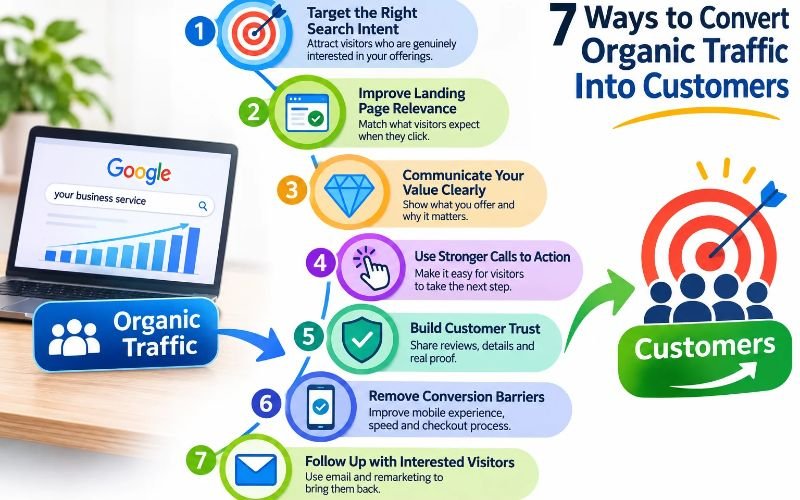
Here are seven ways to improve organic traffic conversion:
- Target the right search intent: Attract visitors who are genuinely interested in your products or services.
- Improve landing page relevance: Make sure visitors find the information they expected when clicking your Google listing.
- Communicate your value clearly: Explain what you offer, who you help, and why customers should choose you.
- Use stronger calls to action: Make it easy for visitors to take the next step.
- Build customer trust: Add genuine reviews, transparent pricing information, policies, business details, and relevant proof.
- Remove conversion barriers: Improve mobile usability, page performance, forms, and checkout experiences.
- Follow up with interested visitors: Use appropriate email, enquiry management, and remarketing strategies to support longer buying journeys.
The most effective approach is to identify where potential customers are leaving, understand why they are leaving, and fix the specific problem instead of making random website changes.
Why Does Your Website Get Organic Traffic but No Customers?
Before changing your website, understand that not every visitor arrives with the intention of buying.
Someone searching for “what is technical SEO” may want to learn about the subject. Another person searching for “technical SEO agency for ecommerce websites” is more likely to be evaluating service providers.
Both searches can generate organic traffic, but they represent different stages of the buying journey.
If you treat every visitor as a potential immediate customer, your conversion strategy will not work effectively.
Consider this example.
Imagine an ecommerce store receives 10,000 organic sessions every month but generates only 100 purchases.
Its purchase conversion rate is:
Conversion rate = (Number of purchases ÷ Total sessions) × 100
100 ÷ 10,000 × 100 = 1%.
This means the store generates one purchase for every 100 sessions.
Now imagine the business improves its website experience and increases its purchase conversion rate to 1.5%, while maintaining the same traffic volume.
It would generate 150 purchases instead of 100.
That is 50 additional purchases from the same number of sessions.
This is an illustrative example, not a guaranteed CRO result. Actual performance depends on product demand, pricing, traffic quality, competition, customer experience, and other factors.
The important lesson is that improving conversions can create additional business opportunities without depending entirely on increasing organic traffic.
1. Attract Visitors Who Have the Right Search Intent
One of the biggest reasons websites struggle to convert organic traffic is that they attract visitors who are not looking for what the business actually sells.
A website might receive thousands of visits from informational keywords but very few visitors from commercial or transactional searches.
For example, consider an SEO agency targeting these keywords:
| Search query | Likely intent | Conversion opportunity |
| What is SEO? | Informational | Low immediate buying intent |
| How does ecommerce SEO work? | Informational | Educational opportunity |
| Ecommerce SEO services | Commercial | High service interest |
| Ecommerce SEO agency in Florida | Commercial/local | Strong enquiry potential |
| Hire an ecommerce SEO agency | Transactional | Strong buying intent |
The mistake is treating all these keywords equally.
Informational content is valuable because it introduces your business to potential customers. However, visitors researching a topic may not be ready to purchase immediately.
Commercial pages should help people compare solutions, evaluate providers, and understand what they will receive.
How to fix the problem
Start by reviewing the search queries bringing visitors to your website.
In Google Search Console:
- Open the Performance report.
- Select Search results.
- Review the Queries tab.
- Identify the searches generating clicks.
- Separate informational searches from commercial and transactional searches.
- Check which landing pages receive those clicks.
Then compare those findings with Google Analytics 4.
For example, if your ecommerce SEO service page receives traffic from people searching for “free ecommerce SEO tools,” you may have an intent mismatch.
You could improve the page’s keyword targeting, content positioning, and search snippet so it attracts more relevant visitors.
Do not remove all informational content. Instead, create a clear journey from educational content to relevant service or product pages.
Practical recommendation: Build a keyword-to-page mapping document. Every important keyword group should have a suitable landing page and a clear purpose.
2. Make Your Landing Pages Match What Visitors Expect
Imagine someone searches Google for “emergency plumbing services near me.”
They click your website expecting to find information about emergency plumbing availability, service areas, contact options, and response arrangements.
Instead, they land on your homepage, which discusses general plumbing services without mentioning emergencies.
What happens?
The visitor may leave and contact another business.
This is a landing page relevance problem.
Your landing page should continue the conversation that started in Google Search. The headline, content, offer, and next step should match what the visitor expected to find.
What should an effective landing page include?
A conversion-focused landing page should answer five important questions:
- What product or service do you offer?
- Who is it intended for?
- What problem does it solve?
- Why should someone consider your business?
- What should the visitor do next?
For example, an ecommerce SEO landing page could include:
| Landing page element | What to communicate |
| Main headline | Ecommerce SEO services for online stores |
| Supporting text | Improve product visibility and attract relevant shoppers |
| Services | Product SEO, category optimization, technical SEO |
| Proof | Verified customer results, reviews, and relevant examples |
| CTA | Request an ecommerce SEO audit |
| FAQs | Pricing, process, platforms, and expected timelines |
Avoid sending every organic visitor to your homepage.
A person searching for a specific service should land on the relevant service page. Someone searching for a particular product should land on the appropriate product page whenever possible.
Check your landing pages before redesigning them
Open Google Analytics 4 and navigate to Reports > Engagement > Landing page.
Review:
- Which pages attract the most organic sessions?
- Which pages generate enquiries or purchases?
- Which pages receive visits but very few meaningful actions?
- Are visitors using mobile devices or desktops?
- Do certain pages attract visitors from locations your business cannot serve?
Prioritize pages with meaningful traffic and a clear commercial purpose.
You do not need to redesign your entire website. Start with the landing pages that represent the biggest opportunities.
3. Explain Your Value Proposition Clearly
A visitor may reach your website, read your headline, and still have no idea why they should choose your business.
This often happens when businesses describe their services without explaining the customer’s actual benefit.
Consider these two examples.
Weak message:
“We provide professional digital marketing and SEO solutions to help businesses grow online.”
More specific message:
“Improve your ecommerce store’s search visibility, fix technical SEO issues, and attract shoppers searching for the products you sell.”
The second message communicates the audience, the problems being addressed, and the intended outcome.
Your homepage and important service pages should make your value proposition immediately understandable.
Use a simple value proposition framework
Try answering these questions:
- Who do you help?
- What problem do they experience?
- What service or solution do you provide?
- What makes your approach relevant to their situation?
For example:
An accounting firm could communicate:
“We help small businesses manage bookkeeping, tax preparation, and financial reporting so owners can maintain accurate records and make better financial decisions.”
An ecommerce store could communicate:
“Shop durable everyday travel bags with clear product specifications, delivery information, and easy returns.”
A dental practice could explain its available treatments, appointment process, location, and what patients can expect during their visit.
The objective is not to write a clever marketing slogan. It is to remove uncertainty.
Address customer objections
Visitors often have questions that prevent them from taking action.
For a service business, these may include:
- How much does the service cost?
- What is included?
- How long does the process take?
- Do you have experience with businesses like mine?
- What happens after I submit an enquiry?
For an ecommerce store:
- What are the product dimensions?
- Is the product available?
- How much is shipping?
- Can I return or exchange it?
- What payment methods are accepted?
Answering these questions directly can help customers make informed decisions.
4. Give Visitors a Clear Reason to Take Action
A website can have excellent content and still generate few enquiries if visitors cannot identify the next step.
A common mistake is using generic calls to action such as “Learn More,” “Click Here,” or “Submit” everywhere.
These phrases do not always communicate what happens next.
A good CTA should describe the action and, where appropriate, the value of taking it.
Examples of conversion-focused CTAs
| Business type | Weak CTA | More specific CTA |
| SEO agency | Learn More | Request Your Free SEO Audit |
| Ecommerce store | Click Here | Shop the Collection |
| Law firm | Contact Us | Request a Consultation |
| Dental clinic | Submit | Request an Appointment |
| Home services | Learn More | Request a Service Estimate |
| SaaS company | Sign Up | Start Your Free Trial |
Use CTAs that match the visitor’s level of interest.
Someone reading an introductory blog post may not be ready to book a consultation. They might prefer a related guide or a service overview.
Someone visiting your pricing page may be ready to request a quote.
Where should you place CTAs?
Consider placing a relevant CTA:
- Near the top of important service pages.
- After explaining the main service benefits.
- After presenting relevant proof or examples.
- Near pricing information.
- At the end of relevant blog sections.
- At the end of the article.
Avoid placing so many CTAs that they distract visitors from the information they came to read.
Give customers an appropriate next step
Not every visitor is ready to buy.
Create different conversion opportunities based on buying intent:
Early research: Download a useful guide or read a related resource.
Comparing solutions: Explore services, pricing, case studies, or product comparisons.
Ready to purchase: Add to cart, book an appointment, request a quote, or contact the business.
This creates a more natural customer journey instead of forcing every visitor into the same sales process.
5. Build Trust Before Asking Visitors to Buy
People rarely spend money with a business they do not trust.
Even if your website ranks well, visitors may hesitate when they cannot verify who operates the business, what customers think about it, or whether the offer is genuine.
Trust becomes particularly important when customers are making expensive purchases or choosing professional services.
What makes visitors hesitate?
Some common trust problems include:
- No clear business contact information.
- No customer reviews or testimonials.
- No information about the company or team.
- Unclear pricing or unexpected charges.
- No shipping, cancellation, or return policies.
- Unsupported performance claims.
- Poor-quality product images.
- Inconsistent business information.
- No examples of previous work.
How to improve website trust
1. Display genuine customer feedback
Use authentic reviews from real customers. Where appropriate, include the customer’s name or business name only with permission.
2. Show actual business information
Make your company details, contact information, location, and support options easy to find.
3. Publish relevant case studies
Explain the customer’s original problem, the work performed, the timeframe, and the verified outcome.
For example, an SEO case study could show:
- The website’s starting position.
- The technical and content issues identified.
- The improvements implemented.
- Changes in organic visibility and traffic.
- Enquiries or revenue changes, if reliably measured.
Do not present rankings or traffic growth as proof of additional sales unless you have supporting conversion data.
4. Explain your policies
Ecommerce websites should make shipping, payment, return, and refund information accessible.
Service businesses should explain their processes, scope, pricing approach, and any relevant limitations.
5. Use relevant professional information
For industries such as healthcare, law, finance, and other specialist services, publish accurate author credentials, professional qualifications, and appropriate expert reviews.
Trust should come from verifiable information, not decorative badges or exaggerated claims.
6. Remove Website Problems That Prevent Conversions
Sometimes visitors want to buy or contact your business but cannot complete the process easily.
The problem might be technical rather than marketing-related.
For example, a customer may click an enquiry button that does not work on mobile. An ecommerce shopper may encounter unexpected shipping costs at checkout. A contact form may request unnecessary information.
These problems can cost businesses potential customers even when their SEO strategy is working.
Common conversion barriers and their solutions
| Website problem | What the visitor experiences | Recommended solution |
| Slow page loading | Waiting too long for content | Optimize images, scripts, and server performance |
| Poor mobile layout | Difficult navigation and reading | Improve responsive design |
| Broken CTA | Cannot complete the intended action | Test and repair buttons and links |
| Long contact form | Too much effort to enquire | Remove unnecessary fields |
| Complicated checkout | Difficulty completing purchases | Simplify the checkout journey |
| Hidden shipping charges | Unexpected total cost | Display shipping information earlier |
| Missing product details | Uncertainty about the purchase | Add specifications and useful images |
| Unclear error messages | Visitors do not know what went wrong | Improve form and checkout feedback |
Pay particular attention to mobile users
Many businesses receive substantial organic traffic from mobile devices.
However, their websites are sometimes designed and tested mainly on desktop screens.
Open your website on a mobile phone and try to complete the same actions as a customer.
For ecommerce:
- Can you select product variations easily?
- Are product images clear?
- Can you see the price and delivery details?
- Is the add-to-cart button accessible?
- Can you complete checkout without difficulty?
For local businesses:
- Is the phone number easy to find?
- Does the contact form work?
- Is the address visible?
- Can visitors easily request an appointment or quote?
Do not assume that a website works correctly simply because it looks good on a desktop computer.
Use behaviour analysis to find hidden problems
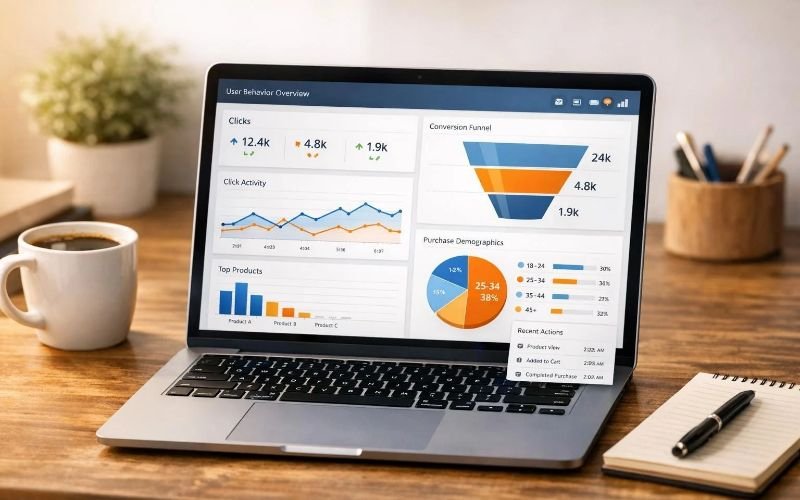
Tools such as Microsoft Clarity can help you understand how visitors interact with your website.
Depending on the implementation and available consent, privacy controls, and traffic data, you can review:
- Heatmaps.
- Scroll behaviour.
- Click activity.
- Session recordings.
- Repeated clicks on non-interactive elements.
- Areas where visitors stop interacting.
For example, a heatmap may show that visitors repeatedly click a service heading because they expect it to open another page.
A scroll map may reveal that very few visitors reach the enquiry form at the bottom of a long page.
These observations give you specific problems to investigate instead of relying on assumptions.
7. Follow Up With Interested Visitors Instead of Losing Every Opportunity
Not every potential customer purchases during their first website visit.
A business owner may visit your service page, compare three agencies, read your case studies, and return several days later.
An ecommerce shopper may explore products, add an item to the cart, and leave before completing checkout.
If your website has no appropriate follow-up process, some interested visitors may never return.
Build a follow-up process around customer intent
Different businesses need different approaches.
For ecommerce businesses:
- Send permitted abandoned-cart reminders.
- Provide useful product information.
- Send order and delivery updates.
- Create relevant post-purchase email sequences.
- Recommend related products when appropriate.
For service businesses:
- Respond to enquiries promptly.
- Send an acknowledgement after a form submission.
- Explain what happens next.
- Follow up with people who requested information but have not made a decision.
- Use a CRM to manage and track enquiries.
For businesses with longer buying cycles:
- Publish educational resources.
- Send useful email updates to subscribers who have consented.
- Share relevant case studies.
- Provide comparison guides.
- Use remarketing only where permitted by applicable advertising and privacy policies.
Make sure your follow-up messages are useful
Avoid sending repeated messages that simply ask whether someone is ready to buy.
Instead, answer the questions that may be delaying their decision.
For example:
An ecommerce customer may need product compatibility information.
A business owner considering SEO services may want to understand the audit process, deliverables, pricing, or reporting structure.
A person requesting a professional consultation may need confirmation of availability and the next steps.
The goal is to help interested visitors make a decision, not pressure them into one.
How to Measure Whether Your Organic Traffic Is Converting
You cannot improve conversion performance consistently without measuring the right actions.
Website traffic, keyword rankings, and impressions are useful SEO metrics, but they do not tell you the full story about business performance.
You should connect search performance with visitor behaviour and business outcomes.
1. Google Search Console
Use Search Console to understand what happens before visitors arrive.
Review:
- Search queries.
- Organic clicks.
- Impressions.
- Click-through rate.
- Average search position.
- Landing pages.
- Device and country performance.
This helps identify whether your website attracts visitors through relevant searches.
2. Google Analytics 4
Use GA4 to understand what visitors do after arriving.
Track meaningful actions such as:
- Form submissions.
- Purchases.
- Phone number clicks.
- Appointment bookings.
- Quote requests.
- Add-to-cart actions.
- Checkout starts.
- Email sign-ups.
Mark important business actions as key events so you can review them in your reports.
3. Microsoft Clarity
Use behaviour analysis to investigate how visitors interact with important pages.
Look for confusing navigation, ignored CTAs, excessive scrolling, repeated clicks, and potential mobile usability problems.
4. CRM or sales records
Analytics can record a form submission, but that does not automatically mean the enquiry is a qualified lead or a paying customer.
Connect website enquiries with your sales records wherever possible.
Record:
- Total enquiries.
- Qualified leads.
- Sales conversations.
- Closed customers.
- Revenue generated.
- Lead source and landing page, where available.
This is particularly important for service businesses, where the customer may contact the company before making a purchase.
Which metrics should you monitor?
| Metric | What it tells you |
| Organic sessions | How many sessions come from organic search |
| Landing page conversion rate | How effectively a landing page generates the selected action |
| Purchase conversion rate | How effectively visits generate completed purchases |
| Lead conversion rate | How effectively visits generate enquiries |
| Add-to-cart rate | How frequently shoppers add products to their carts |
| Checkout completion rate | How frequently checkout starts result in purchases |
| Qualified lead rate | How many enquiries meet your business requirements |
| Revenue from organic traffic | The revenue attributed to organic search under your measurement model |
Choose metrics that match your business model. A local service company should not evaluate its SEO success using ecommerce checkout metrics.
Also remember that Search Console clicks and GA4 sessions are measured differently. Their totals will not necessarily match.
A Practical 30-Day Plan to Improve Organic Traffic Conversions
You do not need to redesign your entire website or implement every CRO technique at once.
Start with the pages that have the greatest potential to generate business.
Here is a practical implementation plan.
| Period | Priority | Actions |
| Days 1–7 | Diagnose | Review organic landing pages, queries, traffic quality, and conversion tracking |
| Days 8–14 | Improve relevance | Fix search intent mismatches, headlines, service messaging, and missing information |
| Days 15–21 | Remove friction | Test mobile usability, forms, buttons, page performance, and checkout |
| Days 22–30 | Build trust and measure | Improve proof, policies, CTAs, follow-up, and conversion reporting |
How to prioritize your work
Do not spend the same amount of time on every page.
Consider this example:
| Page | Monthly organic sessions | Enquiries | Initial priority |
| Homepage | 2,000 | 8 | Review |
| Service page A | 800 | 2 | High |
| Service page B | 500 | 18 | Protect and learn |
| Blog article A | 1,500 | 0 | Investigate intent |
| Product category | 1,000 | 25 | Protect and improve |
These are illustrative figures.
Service page A deserves investigation because it receives relevant traffic but produces relatively few enquiries. Blog article A also needs review, but the right action may be to improve its informational journey rather than force a sales CTA into the article.
The product category already generates conversions, so avoid making unnecessary changes without evidence.
Common Mistakes That Stop Organic Visitors From Becoming Customers
Even businesses investing in SEO and website development make mistakes that weaken conversion performance.
Avoid these common problems:
Publishing more blogs without reviewing existing pages: New content will not automatically solve problems with existing landing pages.
Sending every visitor to the homepage: Different search queries require different landing page experiences.
Using generic CTAs: Visitors should understand exactly what happens when they click.
Making unsupported claims: Exaggerated promises can reduce trust rather than build it.
Ignoring mobile visitors: A website that works on desktop may still create difficulties on smartphones.
Changing website elements without tracking: You cannot determine whether a change helped if you do not measure the relevant outcome.
Treating all enquiries as qualified leads: A large number of irrelevant enquiries does not necessarily indicate business growth.
Ignoring existing customers: Customer experience, retention, and repeat purchases can contribute to long-term business performance.
The better approach is to diagnose, prioritize, implement, and measure.
Frequently Asked Questions
1. How can I convert organic traffic into customers?
Start by attracting visitors with relevant search intent, matching landing pages to their expectations, communicating your offer clearly, using appropriate CTAs, building trust, removing website friction, and following up with interested visitors. Measure purchases and qualified enquiries rather than relying only on traffic.
2. Why does my website get traffic but no sales?
Common reasons include irrelevant search traffic, poor landing page relevance, unclear product or service information, uncompetitive offers, missing trust signals, technical problems, and complicated checkout processes. Review performance by traffic source, landing page, device, and conversion action before deciding what to fix.
3. What is a good organic traffic conversion rate?
There is no single conversion rate that is suitable for every website. Ecommerce stores, local businesses, B2B companies, and professional service providers have different customer journeys and conversion goals. Compare your performance with your own historical data and relevant industry benchmarks, using consistent measurement definitions.
4. Does SEO increase website conversions?
SEO can attract visitors who are searching for relevant products, services, and information. However, rankings and traffic do not guarantee sales. Conversion performance also depends on the landing page, offer, website experience, pricing, trust, and follow-up process.
5. What is the difference between SEO and CRO?
SEO focuses on improving a website’s visibility in organic search and attracting relevant visitors. CRO focuses on improving the proportion of those visitors who complete meaningful actions. Both disciplines work together to support business growth.
6. How do I identify pages that receive traffic but generate no leads?
Use Google Analytics 4 to review organic landing pages and their key events. Compare traffic levels, engagement, devices, and conversion activity. Use Google Search Console to understand which queries bring visitors to those pages. Check whether the pages match the search intent and provide a clear next step.
7. Can I improve conversions without increasing website traffic?
Yes. You can work on existing landing pages, improve the value proposition, simplify forms, strengthen trust signals, improve mobile usability, and remove checkout barriers. These improvements may help generate more conversions from the same amount of relevant traffic, although results are not guaranteed.
8. How long does conversion rate optimization take?
The timeline depends on website traffic, conversion volume, technical complexity, and the changes being tested. Some usability improvements can be implemented quickly, while reliable experiments may require more time and sufficient data. CRO should be treated as an ongoing process.
9. Which tools can help improve website conversions?
Google Analytics 4, Google Search Console, Microsoft Clarity, Google Tag Manager, PageSpeed Insights, and suitable CRM or ecommerce analytics tools can help identify and measure conversion opportunities. The right combination depends on your website and business goals.
10. Should I hire a CRO agency or an SEO agency?
If your website receives relevant traffic but struggles to generate enquiries or sales, a CRO specialist can investigate the conversion barriers. An SEO agency can address traffic quality, search visibility, and landing page relevance. Some businesses benefit from a combined SEO and CRO approach.
Final Thoughts: Turn Your Existing Traffic Into Business Opportunities
Getting visitors from Google is only one part of building a successful online business.
If people arrive on your website but leave without purchasing, enquiring, or booking an appointment, you need to understand what is preventing them from taking the next step.
Start with the pages receiving the most relevant organic traffic. Check whether the content matches the search intent, whether your offer is clear, whether visitors trust your business, and whether they can complete the desired action without difficulty.
You do not always need more website traffic. Sometimes, the bigger opportunity is making better use of the visitors you already have.
At Niche SEO Agency, we combine SEO strategy, technical website analysis, conversion-focused content, user experience improvements, and performance measurement to help businesses identify opportunities to improve website performance.
Want to find out why your website gets organic traffic but generates fewer enquiries or sales than expected?
Explore our Conversion Rate Optimization Services or request a free SEO audit to identify potential opportunities for improvement.
Get more value from the traffic you already earn.